Clara Launcher
Clara Launcher app icon

The phone made big, clear and calm.

Clara Launcher turns any Android phone into a few large buttons for the people and things that matter. It's made for older people, people with low vision, and people living with dementia or other memory and thinking problems. Family can see the screen and fix things from far away.

β–Ά Get it on Google Play

7 days free, then $3.99 a month, through Google Play.

  • 7-day free trial
  • Android 8 or newer
  • Family remote control
  • Kind to memory loss
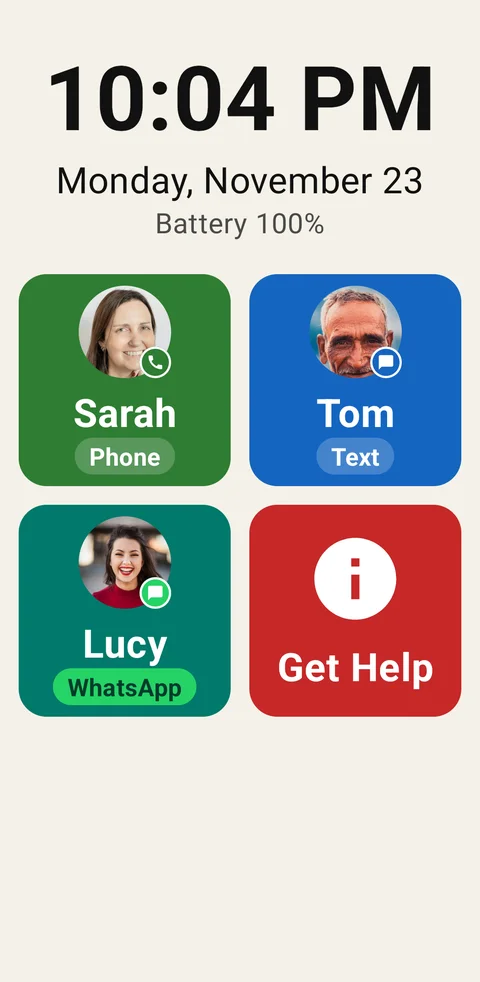
Clara Launcher's home screen: a large clock and date, then four big buttons: Sarah to phone, Tom to text, Lucy on WhatsApp, and Get Help

Features

Everything the phone needs. Nothing it doesn't.

Each screen has a handful of big buttons with plain words. No tiny icons, no menus to get lost in.

☎

One-tap calls

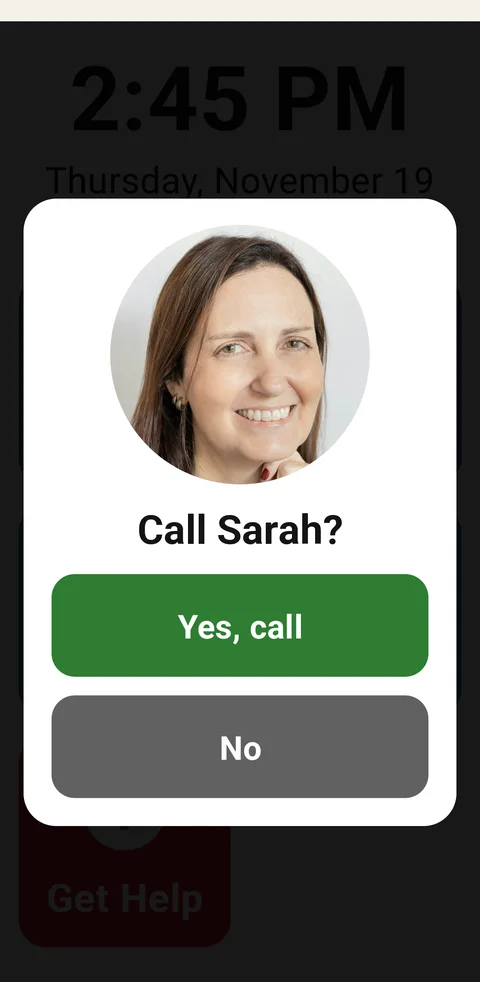
A button with a person's photo. "Call Sarah?" Yes or No, so calls aren't made by accident.

πŸ“ž

A big phone app

Huge Answer and Hang up, Louder and Quieter, Speaker, a big keypad and a Voicemail button.

πŸ’¬

Messages, read aloud

New texts and WhatsApp messages pop up full size with Read it to me. Reply with one tap.

πŸ›Ÿ

Remote control by family

One tap texts family a link. They see the screen and can tap, scroll and type for them.

βœ‰

Big-text email

A simple inbox with photos and large print. Read, listen and reply. No search, no delete.

πŸ”’

Locked so it stays put

A PIN keeps the buttons from being changed by accident. An optional lockdown hides everything else.

🟒

WhatsApp, simply

Video call, voice call or message a person straight from their button.

🎨

Your size, your colours

One, two or three buttons per row. Text up to 160%. Light, dark or high contrast.

🌐

Set up from anywhere

Change the buttons from your own phone or computer. The phone picks up the changes by itself.

Dementia and memory loss

Made for people who find phones confusing.

For someone living with dementia, Alzheimer's, the effects of a stroke or another cognitive condition, an ordinary phone is full of traps: tiny icons, menus, pop-ups and things that move. Clara Launcher takes all of that away.

  • The same few buttons, always in the same place. Nothing moves and nothing new appears, so habits can form.
  • Faces, not icons. Each person's button shows their photo and name.
  • The time, the day and the date, big. A help on days that run together.
  • Nothing can be broken by accident. Settings are locked with a PIN. Lockdown mode can hide everything else on the phone.
  • Calls ask first. "Call Sarah?" Yes or No, so nobody is rung over and over by mistake.
  • Messages read aloud, in large print, with ready-made replies, for when reading or typing gets hard.
  • Family can fix it from home. When they can't explain what's wrong, you can see it and sort it yourself.
Home screen with a large clock, the day and date, and big buttons including one with a person's photo and name

Phone calls

Calls without the fiddly bits.

Clara Launcher can be the phone app itself, so every call uses its own big, clear screens.

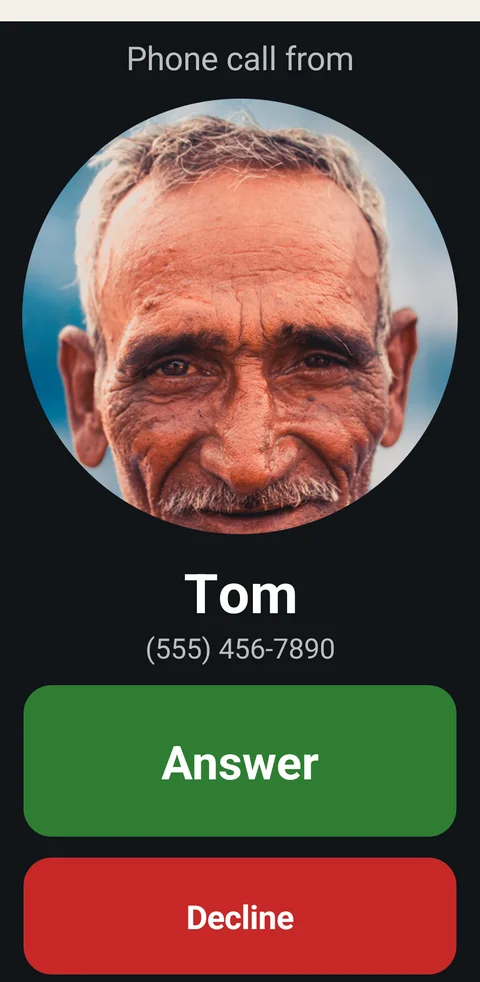
  • Who's calling, shown big, with a huge green Answer and a red Decline.
  • Louder and Quieter with a volume bar you can see, plus Speaker.
  • The screen switches off against the ear, so a cheek can't press anything.
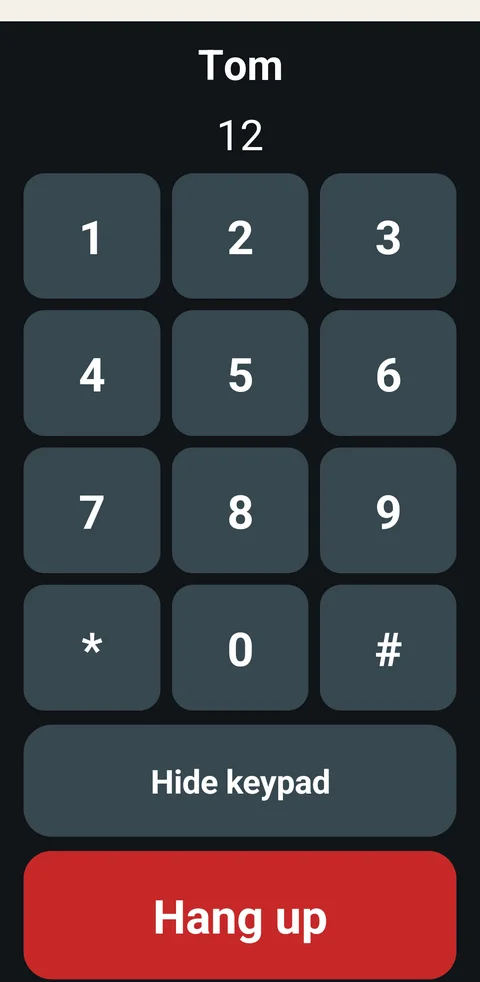
  • A big Keypad for "press 1" menus. It opens by itself when calling voicemail.
  • Leave the call by mistake? A green banner on the home screen goes straight back to it.
Incoming call screen: 'Phone call from Tom' with a large green Answer button and a red Decline button
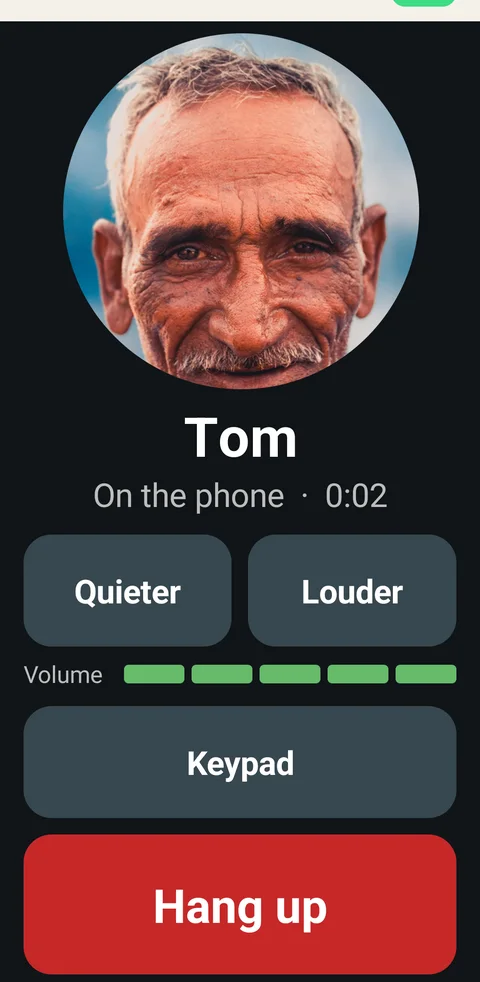
During a call: Tom, 'On the phone 0:02', Quieter and Louder buttons, a volume bar, Keypad and a big red Hang up

Dial pad and voicemail

Big numbers. A button for voicemail.

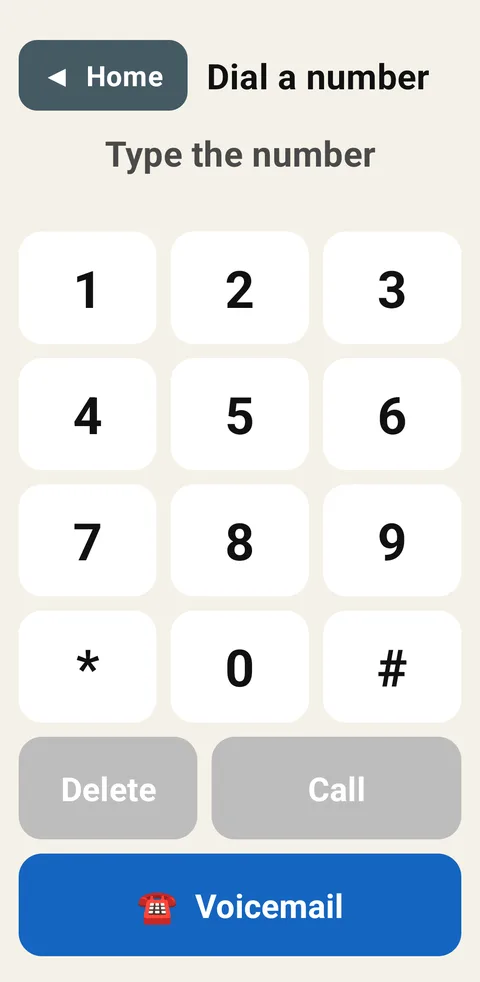
  • Keys the size of a thumb, with the person's name shown once the number matches a contact.
  • One big blue Voicemail button. No need to remember a number or hold down 1.
  • Every call button asks first, so nobody is rung by accident.
Big dial pad with large number keys, Delete, Call and a full-width blue Voicemail button
A pop-up asking 'Call Sarah?' with big Yes, call and No buttons

Messages

Texts you can read, and hear.

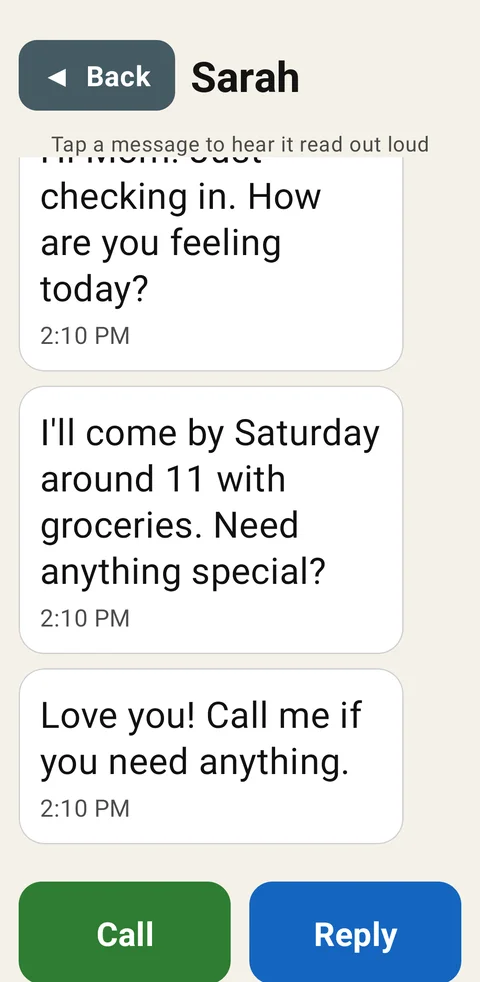
  • A new text or WhatsApp message fills the screen with the sender's photo and the words in large print.
  • Read it to me reads the message out loud, or turn on reading every new message automatically.
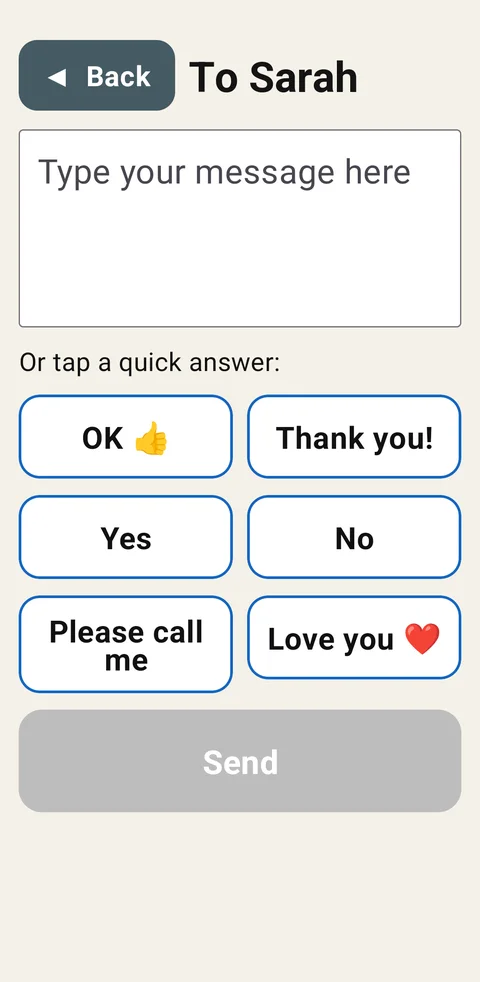
  • Reply with big ready-made answers like "OK", "Call me" or "Love you", or write your own.
  • Photos from family show big. Sending one back is one button.
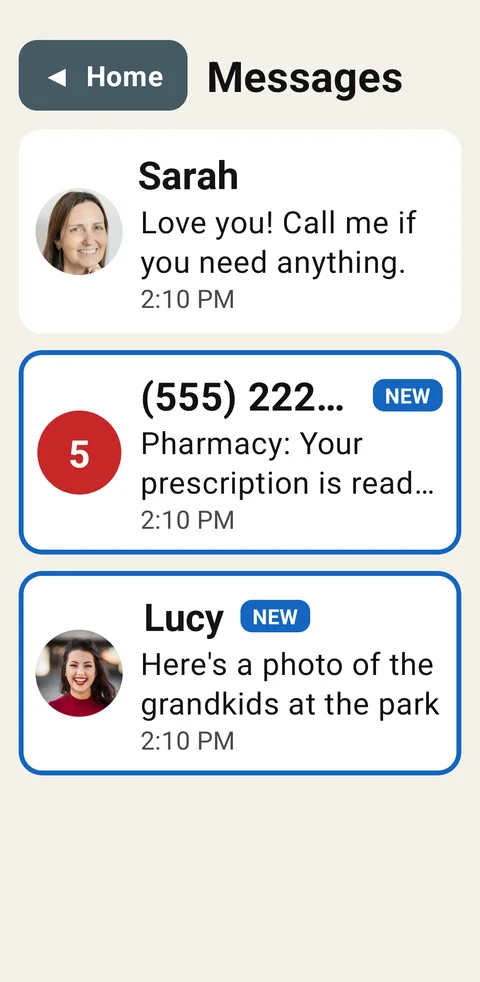
Messages list with large cards for Sarah, a pharmacy and Lucy, marked NEW
Reply screen with a large text box and quick answers: OK, Thank you, Yes, No, Please call me, Love you

Remote help and control

"Which button?" Now you can see for yourself.

Remote help is built into Clara Launcher. There's nothing extra to install on either side, and no account to sign in to.

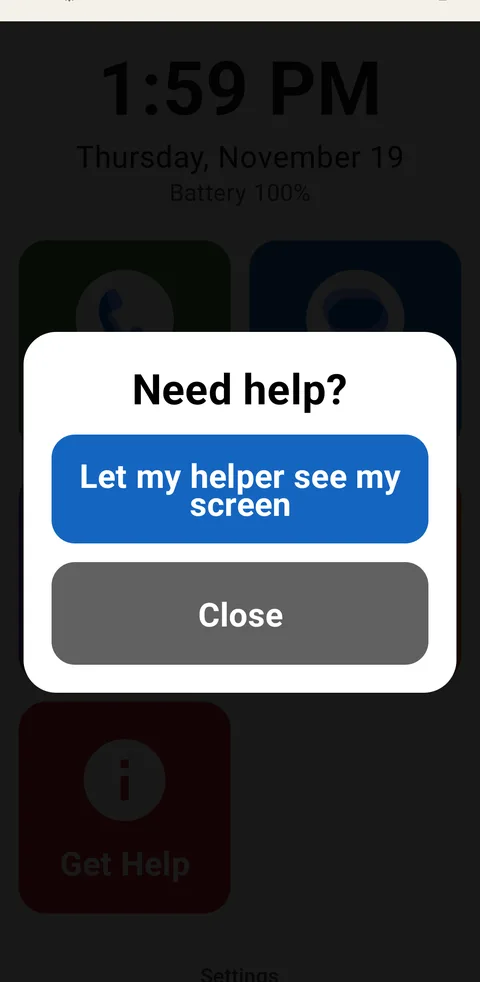
  • They tap Get Help, then Start now. Clara Launcher texts you a link by itself.
  • Open the link on any phone or computer and you see their screen, live, in your web browser.
  • Take control and use their phone for them, or just point with a yellow circle so they learn where to tap.
  • It works in the middle of a phone call, so you can talk them through it.
  • It stops when they tap Stop sharing, or after 2 minutes if nobody connects.
A 'Need help?' pop-up with a big blue 'Let my helper see my screen' button and Close

They ask

A tap on Get Help on their phone, then Start now. You get a text with a link.

You look

Tap the link. Their screen opens in your browser. No app, no sign-in.

You show them

Point to the right button while you chat. They tap Stop sharing when it's sorted.

Use their phone as if it were in your hand.

Once you're connected, their screen appears in your web browser, on a computer, tablet or another phone. Your mouse or finger becomes theirs.

  • Tap, hold and scroll. Click to tap, hold to long-press, drag or use the mouse wheel to scroll.
  • Type for them. Fill in a Wi-Fi password, a search or a message from your own keyboard.
  • Phone buttons on screen. Back, Home, Recent apps and Notifications are one click away.
  • Fix the settings. Open Clara Launcher's settings to change a button, a photo or a contact, or open Android's own Settings.
  • Show, don't do. Switch off "Tap for them" and your clicks only show a yellow circle, so they can follow along.
  • Clear on slow internet. Choose a faster or a sharper picture.

They stay in charge

Nobody can look without being asked. Sharing starts only when they tap Get Help and then Android's Start now. A big red Stop sharing button ends it at any time and takes them back to the home screen. If nobody connects within 2 minutes, sharing stops by itself. The picture goes straight from their phone to your browser.

A closer look

Every screen, big and plain.

Videos

Watch how it works

Two short videos, about two minutes each, with captions and a spoken guide.

Setting up Clara LauncherInstalling from Google Play and the setup wizard, step by step.
Using Clara LauncherCalls, texts, new messages, the dial pad, and asking for and giving help.

Install

Set it up in about ten minutes.

Do this on the phone that will use Clara Launcher. It's easiest with the phone in hand.

β–Ά Get it on Google Play

Opening this page on a computer? On the phone, open the Play Store app and search for Clara Launcher.

1. Install it

  1. On the phone, open the Play Store app and search for Clara Launcher (or tap the Get it on Google Play button on this page).
  2. Tap Install, then Open.
  3. Start the 7-day free trial. Nothing is charged until the trial ends, and you can cancel any time in the Play Store.

2. Follow the setup wizard

  1. Clara Launcher opens a setup wizard. Tap Start and follow each step. A green tick shows when it's done.
  2. Type the phone owner's name and the helper's name and number.
  3. To let the helper tap for you, tap Open Accessibility settings and turn on Clara Launcher.
  4. Set a PIN so the buttons can't be changed by accident.

Updating: Google Play keeps Clara Launcher up to date by itself. Settings, contacts and buttons are kept.

FAQ

Questions people ask

Something not covered? Ask whoever set up the phone, or use Get Help.

How much does it cost?

Clara Launcher costs $3.99 a month through Google Play, after a 7-day free trial. That gives you a week to set it up on the phone and make sure it suits before you pay.

Remote help and control are included. There are no ads.

Is it suitable for someone with dementia?

Yes, that's who it's designed around. Everything is big, the buttons never move, photos stand in for icons and settings are locked so nothing changes by accident. Lockdown mode can stop them getting lost in other apps.

Every person is different. Use the 7-day free trial to see how it suits them, and keep the buttons to the few things they really use.

Which phones does it work on?

Android phones running Android 8 or newer, which covers almost every Android phone sold since 2017. It doesn't work on iPhones.

Where do I get it?

From the Google Play Store. On the phone, open the Play Store app, search for Clara Launcher and tap Install. Updates arrive automatically.

Does it remove the phone's other apps?

No. Clara Launcher replaces the home screen only. Every app stays on the phone, and you choose which ones get a button. Texts, calls and contacts stay in Android's own storage, so nothing is lost if you stop using it.

What does the helper need?

Just a computer, tablet or phone with a web browser. The helper taps the link in the text message. There's nothing to install and no sign-in.

What can the helper do remotely?

Almost anything they could do holding the phone: tap, long-press, scroll, type, press Back and Home, pull down notifications and change settings. Or they can just point, so the person learns where to tap.

Tapping for them needs Android's Accessibility switch turned on for Clara Launcher, once, during setup.

Can the helper see my phone whenever they like?

No. Sharing only starts when the phone's owner taps Get Help and then Android's Start now. Android always asks; that step can't be skipped.

Sharing ends when Stop sharing is tapped, or after 2 minutes if nobody connects. The picture goes straight from the phone to the helper's browser.

Does remote help work during a phone call?

Yes. The call screen has a Get help button, so you can talk them through it while you look. Back to my call returns to the call.

How do I change the buttons or settings?

Swipe down firmly on the home screen, or press and hold the clock for 2 seconds. If a PIN is set, it asks for it first. Settings close and lock again as soon as you leave them.

Helpers can also change the buttons from anywhere with remote setup. The phone checks for changes on a schedule.

Can it make other apps' text bigger?

Yes. Settings β†’ Text and display size in other apps sets the phone-wide font size, so apps like WhatsApp and Google Messages get bigger too. Clara Launcher's own screens keep their own size.

What is lockdown (kiosk) mode?

An optional mode that hides the notification shade and blocks Android Settings and any app without a button. It's for people who get lost easily. It needs a one-time setup from a computer on a freshly reset phone.

Does it work with WhatsApp?

Yes. A WhatsApp button for a person shows their photo with big Video call, Voice call and Message buttons. New WhatsApp messages pop up full size and can be read aloud.

How do I remove it?

Settings β†’ Other β†’ Remove Clara Launcher from this phone… walks through each step and ticks them off. The phone goes back to its normal home screen, phone app and texting app.

Give someone a phone they can use.

Free for 7 days, then $3.99 a month. Set up in about ten minutes.

β–Ά Get it on Google Play